

The first time my Claude Code workspace didn’t know something, it went and learned it as a Claude Code skill.
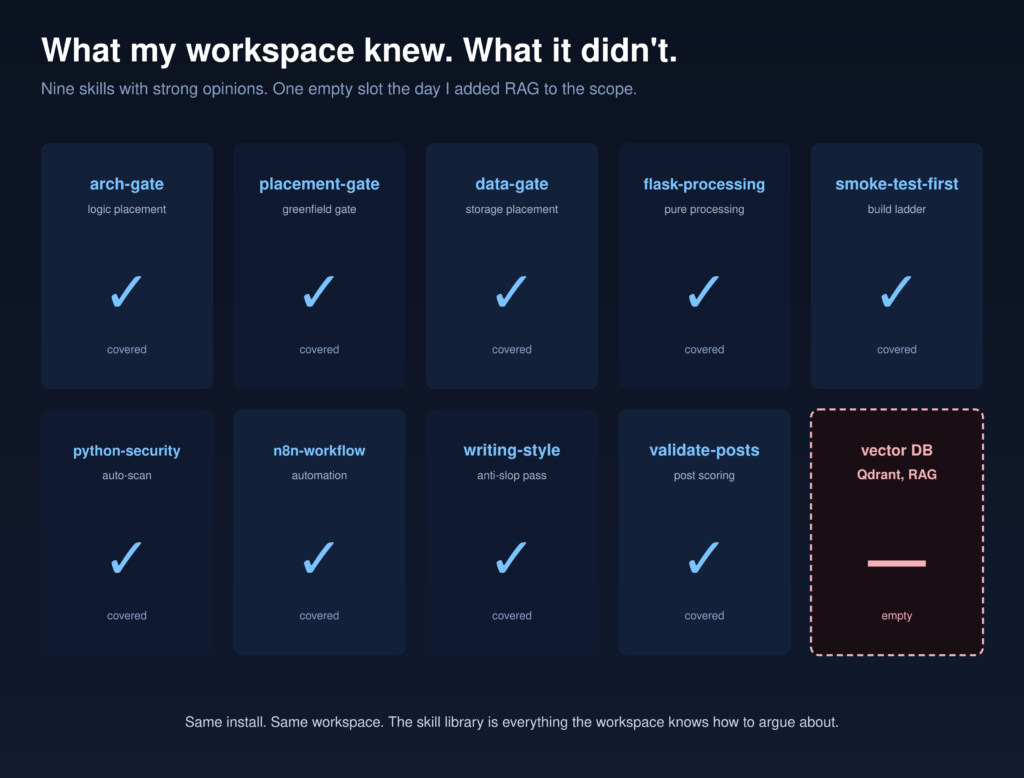
I’m three commits into a RAG build. The Flask side is humming, the n8n side is humming, and I open the Claude Code workspace to start on Qdrant. Empty. No skills, no opinions, no pushback. The same install that had been arguing with me about Pydantic schemas for two weeks suddenly had nothing to say about vector embeddings.
Claude Code hit a $1B annualized run rate within six months of launch and roughly $2.5B by early 2026. The tool is scaling faster than any single team at Anthropic can ship features for it, which is precisely why the skill library ships incomplete on purpose. The default install is a starting kit.
As an AI developer, you want Claude Code to fit your workflow. To do that, you need to look past the default skill set and focus on the tasks you actually repeat. You’ll get the best results when you match skills to your work in Qdrant, RAG, or vector search, then test them against real cases instead of trusting the docs alone. The tricky part is knowing which skills to adopt, which to adapt, and which ones should push back.
Key Takeaways
- Search for community skills that match your stack, especially Qdrant, RAG, and vector search use cases.
- Read each skill’s SKILL.md to confirm compatibility, expected workflow, and missing assumptions.
- Test skills on a small real task in a clean branch before adopting them broadly.
- Prefer skills that push back on bad schemas, broken paths, and missing context instead of agreeing blindly.
- Customize or create a targeted skill when existing ones add complexity without improving automation.
Why the Default Claude Code Skill Library Hits a Wall

I hit the wall the first time I opened Claude Code for a real Claude Code RAG build and asked it to help with Qdrant. You learn fast that the default skills library covers general coding, but not your edge cases.
That’s the problem. Default skills limitations show up the moment you need vector search, schema choices, or tool-specific prompts. If you want extending automation capabilities, you need community skill integration, not hope.
Default skills fail when vector search, schema choices, and tool-specific prompts demand real community skill integration.
Read the SKILL.md, check who maintains it, and test it against a small task. If it won’t argue back, it’ll waste your time. You get better results by engaging with developers who build these skills and by treating the library as a living layer.
That’s how you start enhancing AI productivity.
How to Find Claude Code Skills for Qdrant and RAG

You can start by searching for Claude Code skills that mention Qdrant, RAG, or vector search, then read the `SKILL.md` to see what the skill actually expects from your setup.
Check who built it, what tools it assumes, and whether it fits your stack before you install Claude Code skills.
After that, run a small RAG test and see if the skill pushes back with useful corrections instead of just agreeing with you.
Finding Qdrant Skills
The first time I opened Claude Code for a Qdrant-backed RAG build, the gap was obvious. You won’t find a default skill for Qdrant integration, so you have to search the community first.
Look for Claude Code skills that mention Qdrant, RAG, embeddings, or MCP, then read the SKILL.md file like code. Check who wrote it, what stack it assumes, and whether it fits your workflow. That’s your first skill evaluation pass.
If the maintainer shows clear docs and active community collaboration, that’s a good sign. Next, install it in a clean branch and compare it with your own custom development needs.
Don’t skip practical testing, but keep it small and focused. If the skill matches your vector store, your chunking, and your prompts, keep it. If not, write your own.
Testing RAG Skill Fit
A skill file can look good in search and still fail in practice, so I test it in a clean branch with a small Qdrant-backed RAG task before I trust it. You want Claude Code skills that fit your workflow, not generic promises.
I check whether the SKILL.md matches my stack, mentions vector databases, and handles project gaps without handholding. Then I run a narrow prompt, compare the answer to source docs, and see if the skill pushes back on bad assumptions. That tells you if the skill helps skill development or just decorates the library.
Good community collaboration shows up fast. The maintainer explains tradeoffs, and the skill produces clear agent improvements instead of vague output. If it fails, I either patch it or write my own.
Install Claude Code Skills and Test Them Fast

Install the skill, then run a tiny test against your real setup, not a toy example.
If you’re extending Claude Code for Qdrant or RAG, check whether the skill actually uses the tools you have and whether it fails in the right way.
The best skills push back when you’re wrong, so if it just rubber-stamps your prompt, it’s not ready.
Install The Skill
Once you’ve found a community skill that looks sane, install it and test it fast. You don’t need ceremony.
Search community skills for the domain you’re missing, then evaluate skill fit by reading the SKILL.md, the assumptions, and the tools it expects. If you’re extending Claude Code around a RAG app, you might install vector database help for Qdrant, not a generic “AI” pack.
AI coding tools now write 46% of the code that active users ship, up from 27% at launch (GitHub). The productivity gap isn’t between developers who use AI and developers who don’t. It’s between developers who direct AI well and developers who don’t. Skills are how you direct it well in a specific domain.
Put the skill where Claude Code loads skills from, then restart your session and inspect the instructions.
Does it map to your stack, or does it force you to change your workflow? Good installs should refine skill library, not bloat it.
Keep the ones that enhance automation tools you already use. Drop the rest. If nothing fits, write your own and keep moving.
Run A Quick Test
Run a quick test as soon as the skill is in place. Ask Claude Code to solve a tiny version of your real task, then inspect the output for skill evaluation.
In my Qdrant RAG work, I used a toy query and a small index, because that exposed integration challenges fast. You’ll see whether the skill loads, whether it calls the right tools, and whether it fits your Claude Code skill library.
Read the SKILL.md, note assumptions, and compare them with your stack. Community contributions can fill gaps, but only if you run a gap analysis first.
If the result feels thin, adjust your adaptability strategies, swap in a better skill, or write a narrower one. Fast tests save time and show where extending Claude Code actually helps.
Check For Pushback
The real test isn’t whether a Claude Code skill installs cleanly. You want to see whether it pushes back when your assumption is wrong.
During code evaluation, give it a small RAG task in Qdrant, then ask for a shortcut you know is risky. If it accepts everything, the skill’s weak. Good Community contributions usually show some friction, because they encode real judgment. That matters for Skill customization and for your own Developer strategies.
Read the SKILL.md, install Claude Code skills fast, then compare the behavior against your stack. If the output matches your architecture too neatly, question it. You’re looking for Infrastructure evolution, not rubber stamps.
The best skill corrects you, names tradeoffs, and points to missing context before you scale it.
Know When to Write Your Own Claude Code Skill
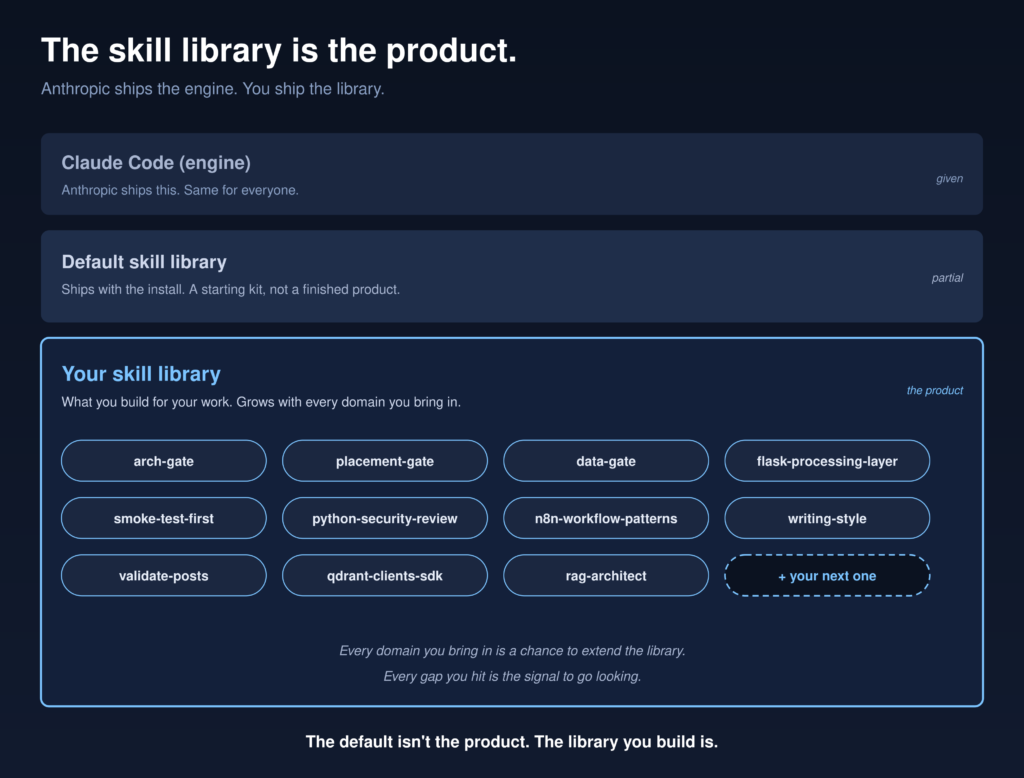
If you can’t find a Claude Code skill that covers your RAG or Qdrant workflow, that’s your signal to write one.
Start with the gap you keep hitting, then build the smallest skill that fills it.
Test it by seeing whether it pushes back when you’re wrong, because a good skill should challenge your assumptions, not just echo them.
Spot The Gap
Sometimes the gap is the signal. You open Claude Code, start a Claude Code RAG task, and the default skill library gives you nothing for vector databases. That’s not a failure. It’s a cue that your work needs skill customization, not generic presets.
- Check whether community contributions already solve the gap.
- Read the SKILL.md, the assumptions, and the learning resources it references.
- Run a quick performance evaluation in your own stack, with Qdrant or whatever you use.
If a skill fits your tools and argues back when your prompt is off, keep it. If it only half-fits, you’ll waste time patching it.
That’s your moment to spot the gap and decide whether extending Claude Code means installing, adapting, or building the next piece yourself.
Write Your Own
When the skill search turns up nothing, or every candidate fights your stack more than it helps, write your own Claude Code skill. You’ve already done the gap analysis.
Now turn that gap into skill customization that fits your repo, your naming, and your workflow. Start small: define the exact task, the tools it should touch, and the mistakes it should catch.
Keep the first draft lean so you can see what it actually changes. Then treat it like living infrastructure, not a one-off file. Your library maintenance gets easier when you own the assumptions.
And if you later find a better pattern, fold in community contributions instead of clinging to local hacks. That’s skill evolution in practice.
Build the skill you wish existed, then keep refining it as your work changes.
Test The Pushback
A good Claude Code skill should push back, not just nod along. If you ask it to wire RAG to Qdrant and it accepts a bad schema, you’re missing the point.
Test the pushback by giving it a shaky plan, then see whether it questions assumptions, asks for missing context, and recommends a safer path. That’s how you separate a real Claude Code skill from a thin wrapper.
- Check whether it resists unsafe defaults.
- See if it improves automation efficiency without hiding tradeoffs.
- Decide if custom solutions need skill library expansion or community contributions.
If the skill can’t argue back, write your own. You need developer creativity, not autopilot.
The best skills act like a careful teammate, not a rubber stamp, and that’s how you extend Claude Code with judgment, not just code.
Make Your Claude Code Skills Argue Back

Don’t let your Claude Code skills just agree with you.
Put them under a real test, and watch for pushback when your RAG plan, Qdrant setup, or MCP wiring is off.
If a skill can’t argue back, it’s not helping you think, it’s just echoing you.
Push Back On Errors
A good Claude Code skill shouldn’t just answer your prompt. It should push back when your request conflicts with the code, the data, or the workflow.
You want error identification to happen early, before bad assumptions spread through your Claude Code RAG build. Strong debugging techniques turn vague failures into specific fixes, and feedback mechanisms keep your skill from repeating the same mistake. That improves user engagement because you’re not fighting a yes-machine.
You’re working with a tool that questions missing context, mismatched schemas, or broken paths.
- Flag uncertain inputs fast.
- Explain why the error matters.
- Suggest the next check.
That habit supports continuous improvement. When you install Claude Code skills, favor the ones that challenge errors, not the ones that smooth them over.
Test For Real Disagreement
Want to know if a Claude Code skill is any good? Make it disagree with you. During skill evaluation, I use three disagreement types: factual, procedural, and scope.
For a Claude Code RAG build, I’ll claim Qdrant is the best store, then ask the skill to challenge that choice. Good testing strategies don’t just check answers, they check resistance. If the skill nods along, it’s weak. If it pushes back with tradeoffs, missing context, or a better path, it’s useful.
Community sourcing helps here, because other builders often expose edge cases you haven’t hit yet. Then you can compare customization options and decide whether to install Claude Code skills, tweak them, or write your own.
The goal isn’t agreement. It’s useful friction that matches your work and catches bad assumptions fast.
Frequently Asked Questions
How Do I Update Claude Code Skills Without Breaking Existing Claude Code Workflows?
ou update skills by versioning them, staging changes, and testing them against existing workflows. You check skill compatibility, code refactoring, testing frameworks, performance optimization, and documentation standards, then roll out incrementally so Claude Code stays stable.
Can I Use Claude Code Skills Across Multiple Client Projects Safely?
Yes, you can, if you separate client project compatibility, track skill performance tracking, and review security considerations. You’ll hit integration challenges, so test each skill against client specific requirements before reusing it across projects.
What Should a Good SKILL.Md Include Besides Instructions?
A good skill.md should include skill documentation essentials, user feedback integration, testing best practices, performance metrics tracking, and collaboration tools usage, like a blueprint with room for revisions. You’ll guide behavior, measure outcomes, and keep it maintainable.
How Do I Version-Control Custom Claude Code Skills?
You version-control custom Claude Code skills in git, keep each skill’s SKILL.md, tests, and examples together, enforce documentation standards, and use code skill testing in CI for collaborative skill development across version control systems.
Should I Keep Claude Code Skills Local or Share Them With My Team?
You should keep core skills shared, and hold experimental ones local. Shared skills boost team collaboration, project consistency, and knowledge transfer. Local skills preserve skill ownership while you test. I’d start local, then publish what proves useful.
Conclusion
AI talent readiness is the lowest organizational dimension in the enterprise, sitting at 20% versus infrastructure at 43% and data at 40% (Deloitte State of AI in the Enterprise 2026). Companies have the tools. They don’t have the people who know how to direct them. The skill library you maintain is the difference between being one of those people and not.
If you’ve only ever used the skills Claude Code came with, you’re running it the way someone runs a new laptop with just Notepad installed. The default isn’t the product. The skill library you build is. Go find the skills that match your work, install them, break them, and write your own when nothing fits.